AIS for Boaters: See the Ships Before They're On Top of You
A ship that takes a mile to stop may never see your boat. AIS puts you on its bridge display, and puts every ship around you on your chart.
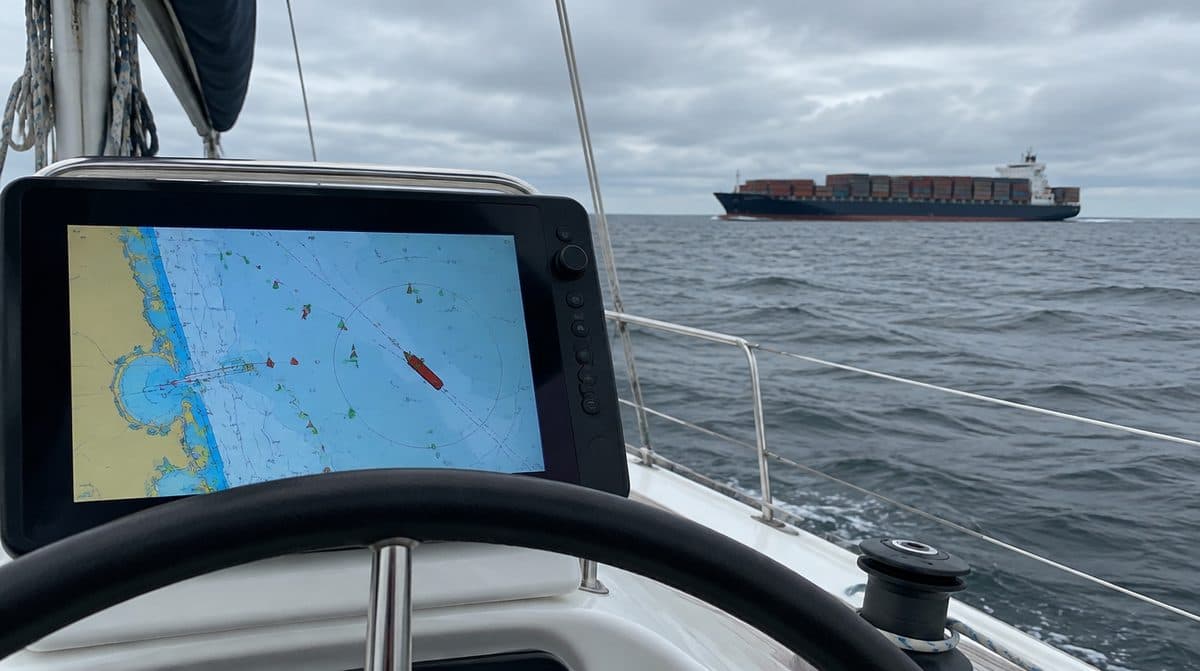
Crossing a shipping channel in poor visibility is one of the most stressful moments in boating. AIS shows you who's out there and where they're headed. A ship that takes a mile to stop is not going to maneuver around your bowrider, and from its bridge you may be invisible in any kind of sea. AIS flips that equation: instead of hoping the big traffic sees you, you see them, by name, with course and speed, long before your eyes could pick them out.
What AIS Actually Broadcasts
AIS is a digital broadcast system that rides on VHF radio frequencies. Equipped vessels transmit their identity, position, course, and speed at regular intervals, and every AIS device in range picks those messages up and plots them. Because the data includes course and speed, your display can do the math that matters: how close will that target pass, and when. That's the difference between radar and AIS in a nutshell. Radar shows you an anonymous blob; AIS shows you a named vessel, where it's going, and whether you two have an appointment you didn't ask for.
Receiver vs. Transponder
- AIS receiver: you see other AIS vessels but they do not see you. Cheaper, good awareness.
- AIS transponder (Class B): you see others AND broadcast your position so others see you. Much safer, especially in shipping lanes.
For real collision avoidance, a transponder is worth it. A receiver is genuinely useful, and it's the budget path into AIS, but it leaves the job half done: you can dodge the tanker, but the tanker's watch officer still has no idea you exist. With a transponder, your boat shows up on the bridge displays of every ship around you, labeled and tracked, and a watch officer can alter course for a target long before anyone's adrenaline gets involved.
Within transponders, newer Class B units using SOTDMA (often sold as Class B+) transmit with more power and get more reliable time slots in heavy traffic than older Class B designs, which helps your position updates get through when it's crowded. If you run busy commercial waters, that's the version to favor.
Integration
AIS data overlays on your chartplotter and can trigger collision alarms. Confirm compatibility with your display and that you have a GPS source and VHF antenna setup. An AIS unit needs two connections to do its job: a GPS position source (many transponders include their own GPS, which simplifies life) and a VHF antenna. You can give it a dedicated antenna or share your radio's antenna through a proper AIS antenna splitter. Never tee the two together with plain connectors; a splitter exists to protect the radio and the AIS from each other. Then connect the AIS to your plotter over your boat's network and the targets appear right on your chart.
MMSI: One Number, Programmed Once
A transponder needs an MMSI number programmed in, usually the same one as your DSC VHF. Your MMSI is your boat's identity across the whole safety system, so your radio and your AIS should carry the same one. Take the programming step seriously: many transponders can only accept an MMSI once before requiring a dealer reset, so type it like you mean it. If you don't have an MMSI yet, sorting that out starts with your radio; our VHF radio guide covers DSC and MMSI registration.
Alarms Worth Setting
The quiet superpower of AIS is the CPA alarm: closest point of approach. You tell the system how close is too close and how much warning you want, and it watches every target's track against yours, continuously, without getting tired or distracted. Set it to values that fit your waters. Too tight and a near miss is already developing when it sounds; too loose and it cries wolf in every anchorage until you turn it off, which is how safety gear dies.
What AIS Is Not
AIS only shows vessels that are transmitting. Commercial ships are required to transmit; small recreational boats, paddlers, and logs are not on the system at all. So AIS complements your eyes and radar, it doesn't replace either. Treat an empty AIS screen as information about AIS traffic, not proof of an empty ocean. The combination is the win: radar sees everything solid, AIS names the players that matter most, and your eyeballs stay the final authority.
From the Water
Set a collision alarm with a sensible closest-approach distance. It's the alert that catches what you miss while you're busy. Tune it over a few trips instead of accepting the default: open water deserves a wide margin and lots of warning, while a busy harbor needs a tighter setting so the alarm means something when it sounds.
Where to Get It Everything in this guide is stocked at Boat Supplies Direct, the Nautical Network marine parts store.
In stock as this guide goes up: - em-trak B952 Class B AIS transceiver, 5W SOTDMA with WiFi and Bluetooth - SI-TEX MDA-1 Class B AIS transceiver with internal GPS - Digital Yacht AIS100 AIS receiver
Browse the full range: - Shop AIS - Read the full buying guide, including FAQs
More from the Wire
 Buying Guides
October 18, 2026
Starting vs. Deep Cycle: The Battery Mistake That Strands Boaters
Starting, deep cycle, or dual purpose, and flooded, AGM, or lithium. How to pick the battery type that will not leave you stranded.
Read more Buying Guides
October 18, 2026
The Onboard Charger: Cheap Insurance for Expensive Batteries
Batteries die young when they sit half-charged. How to size an onboard charger by amps, banks, and chemistry.
Read more Buying Guides
October 18, 2026
Battery Switches and Isolators: Never Get Stranded by a Dead Battery
The switch and isolator setup that keeps your starting battery ready while the house bank runs your gear.
Read more