NMEA 2000 Made Simple: Getting Your Electronics to Talk
One backbone, two terminators, no exceptions. The simple rules that finally get a boat's electronics talking to each other.
Modern boats run electronics from several brands that all need to share data. The plotter wants engine numbers, the pilot wants heading, the VHF wants position, and the fuel level wants to show up on the big screen. NMEA 2000 is how they all talk, once the network is built right. Build it wrong and you get the marine version of a group chat where half the crew never gets the message.
The good news: the rules are simple, and once you know them, a healthy network is almost boring. Here is the whole picture.
The Backbone Concept
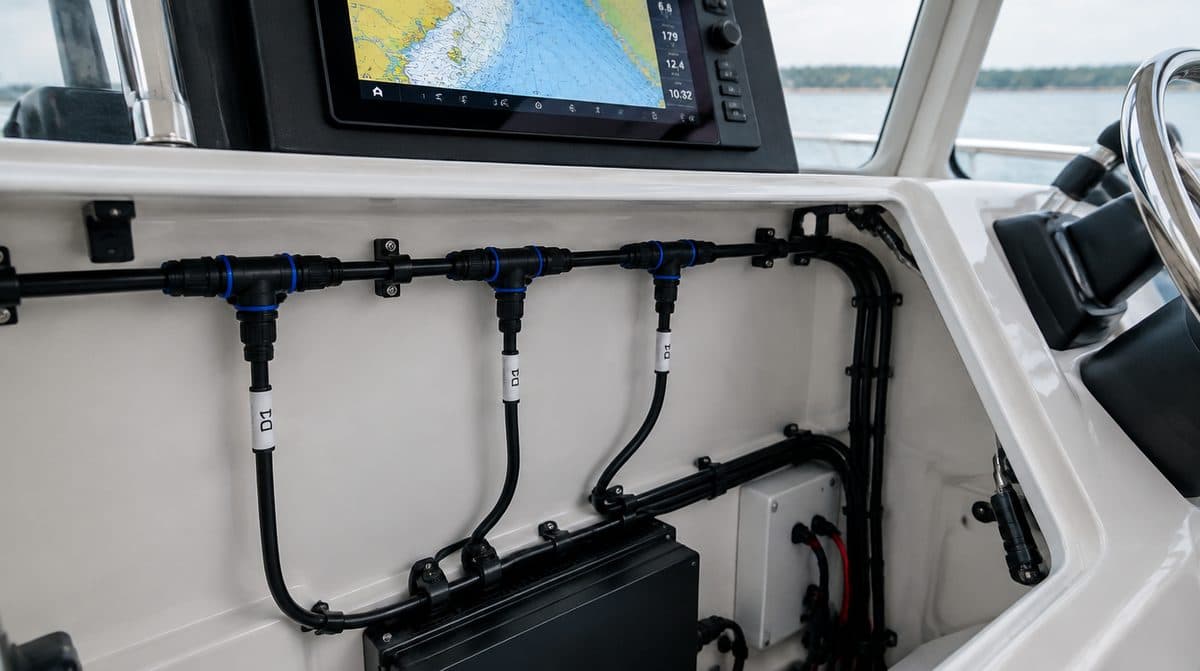
NMEA 2000 uses a single backbone cable with a terminator at each end, and devices drop off it with tee connectors. Build the backbone first, then add drops.
Think of the backbone as the main water line and every device as a faucet teed off it. The backbone runs from one end of your electronics layout to the other, and every device, no exceptions, hangs off it on its own short drop cable through a tee. Devices never daisy-chain to each other, and the backbone never branches into a Y. One trunk, two ends, one terminator on each end. Every reliable network you have ever seen on a boat follows that exact shape.
Components You Need
- Backbone cable and tees
- Two terminators (one at each end)
- Drop cables for each device
- A power tee to feed the network 12V
The terminators are small resistor plugs that cap each end of the backbone, and the network simply does not behave without exactly two of them. Tees are the junctions: one per device, plus the power tee. Drop cables come in fixed lengths, and shorter is better, since a drop is meant to be a short stub off the trunk, not an extension cord. Buy a couple of spare tees and a spare terminator while you are at it. Future you, adding a device at the dock next spring, will be grateful.
Before you order anything, sketch the layout on paper: where each device lives, where the backbone will run, and how long each segment needs to be. Cables come in fixed lengths, so a ten-minute sketch saves a second order and a week of waiting. Leave a little slack at each tee for service, and route the backbone where you can actually reach it later, not sealed behind a glassed-in panel.
Power the Network Properly
The network carries its own 12V supply for the instruments' communication circuits, fed through a dedicated power tee. Feed it from a fused, switched circuit so the network wakes up with the rest of the helm. On a longer backbone, landing power near the middle keeps the voltage even along the trunk, and the manufacturer's planning guide will show the right spot for your layout. What you must not do is inject power at some leftover tee without thinking about it, or feed it from a circuit with a flaky ground. A network with sagging voltage produces exactly the kind of ghost faults that make people swear off marine electronics.
If helm wiring is not your idea of a good Saturday, a verified marine electrician on Waypoint can build a clean backbone in an afternoon.
NMEA 2000 Is Not Your Only Network
Here is where newcomers get tangled: most modern helms actually run two networks. NMEA 2000 carries small, structured data, like position, depth, heading, engine readings, and tank levels. High-bandwidth traffic, such as sonar imaging, radar overlay, and cameras, moves over marine Ethernet instead. Garmin calls its versions Garmin Marine Network and, more recently, BlueNet, and other brands have their own equivalents. If you are networking multiple displays that share sonar, you will be shopping for an Ethernet switch and cables alongside your N2K parts. Different plugs, different rules, same tidy-wiring habits.
Common Mistakes
- Missing or doubled terminators
- Power injected at the wrong point
- Drop cables too long
Getting the backbone and terminators right solves most network headaches.
A few more that show up on real boats: plugging a device straight into the backbone without a tee, routing the backbone through a wet locker with connectors pointed up so they collect water, and coiling leftover cable into a tight bundle jammed behind the plotter. Leave connectors accessible, point them down or sideways, and keep slack loops loose and supported.
Troubleshooting a Quiet Network
When devices vanish from the network, work the physical layer first. Confirm both terminators are present and seated, then unplug drops one at a time until the network comes back; the last drop you pulled is your suspect. Most N2K faults turn out to be a loose connector, a corroded pin, or a terminator someone borrowed for another project and never returned. Your device manuals also describe a simple resistance check across the bus that confirms both terminators with a basic multimeter, no electronics degree required.
From the Water
Label every drop cable at both ends when you install it. Troubleshooting a network you can actually read takes minutes instead of hours. Painter's tape and a marker will do on install day, but a proper label maker survives the bilge, and either one beats playing cable roulette in a seaway while the plotter argues with the engine.
Where to Get It
Everything in this guide is stocked at Boat Supplies Direct, the Nautical Network marine parts store.
In stock as this guide goes up: - Garmin BlueNet 20 Switch, the hub for the Ethernet side of a multi-display Garmin helm - Garmin BlueNet Network Cable, 40 foot, a long trunk run for sharing sonar and radar between stations
Browse the full range: - Shop network cables and modules - Read the full buying guide, including FAQs
More from the Wire
 Buying Guides
October 18, 2026
Starting vs. Deep Cycle: The Battery Mistake That Strands Boaters
Starting, deep cycle, or dual purpose, and flooded, AGM, or lithium. How to pick the battery type that will not leave you stranded.
Read more Buying Guides
October 18, 2026
The Onboard Charger: Cheap Insurance for Expensive Batteries
Batteries die young when they sit half-charged. How to size an onboard charger by amps, banks, and chemistry.
Read more Buying Guides
October 18, 2026
Battery Switches and Isolators: Never Get Stranded by a Dead Battery
The switch and isolator setup that keeps your starting battery ready while the house bank runs your gear.
Read more